Editing the company description
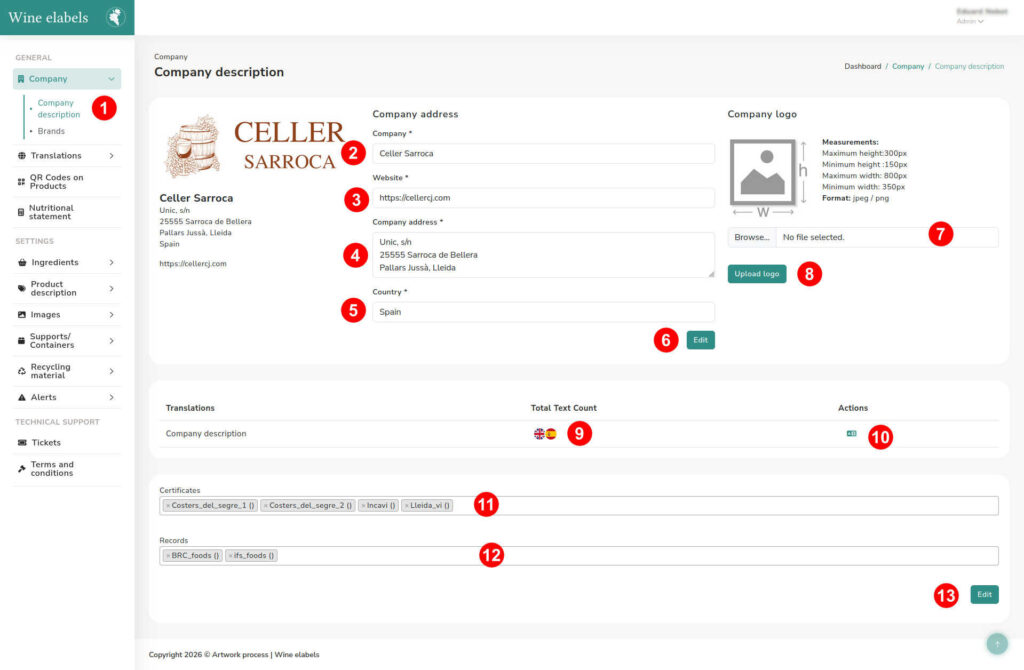
To edit your company’s information, access the left sidebar on the screen and select Company > Company Description. Next, four configuration blocks will be displayed:
1. General information
In this block, you can modify the company’s main data:
- Company name (2)
- Website (3)
- Address (4)
- Country (5)
Once the changes are made, click the Edit (6) button to save them.
2. Logo
This block allows you to update the company logo. Here you can see the information of the current image and select a new file from your computer (7).
To apply the change, click on Upload image (8).
3. Company description
In this section, you can write or modify the description of your company (9), as well as manage its translations (10).
4. Certificates and regulations
This block will only be displayed if images of the following have been previously uploaded:
- Certificates (11)
- Records and health regulations (12)
To save any modification in this section, click the Edit (13) button.