
support@wine-elabels.com

Guide to easily calculate nutritional values

Nutritional declaration

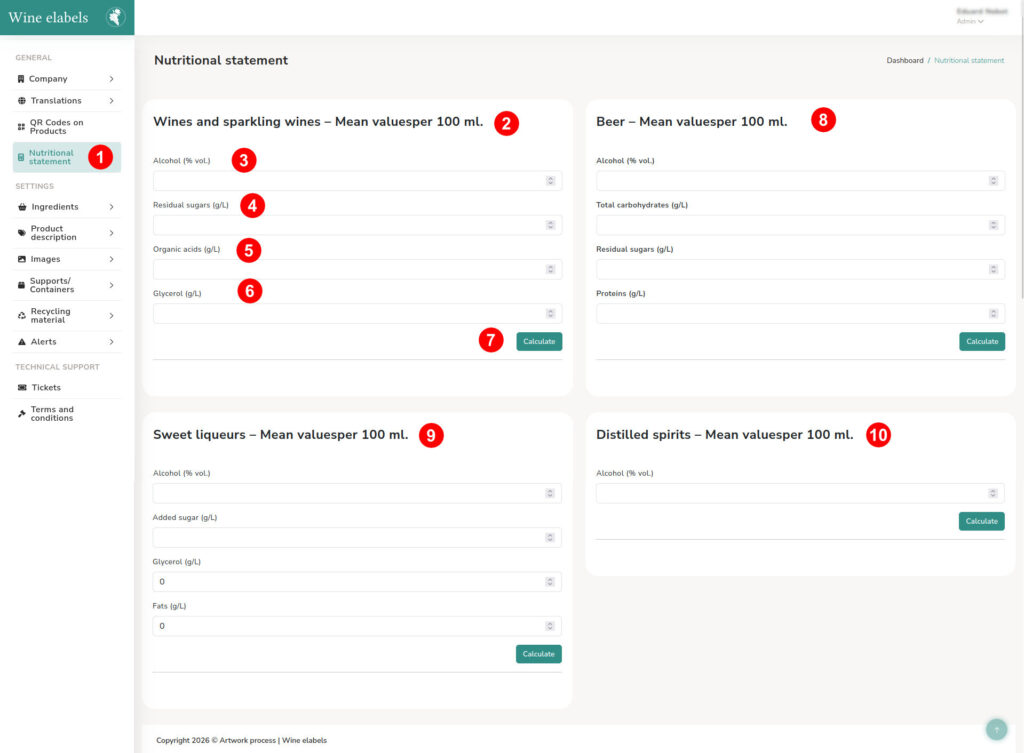
Access the side menu located on the left side of the screen and select the option “Nutritional declaration”.
Then, four calculators will be displayed, each corresponding to a type of beverage:

  • Wines and sparkling wines – Average values per 100 ml (2)
  • Beer – Average values per 100 ml (8)
  • Sweet liqueurs – Average values per 100 ml (9)
  • Distilled – Average values per 100 ml (10)

Example: calculation of nutritional values of wine (2)

To perform the calculation, enter the following parameters:

  • Alcohol (% vol.) (3)
  • Added sugar (g/L) (4)
  • Glycerol (g/L) (5)
  • Fats (g/L) (6)

Once the fields are completed, click the “Calculate” button (7).
The system will automatically display the resulting nutritional information below the button.
Categories

Privacy Policy

Data Controller: The data provided through this form will be managed by Artwork Process S.L., owner of the service Wine e-labels, in compliance with the General Data Protection Regulation (GDPR) and Spanish data protection legislation.

Purpose: The collected data will be used exclusively to respond to your inquiries or provide information about our services. No commercial communications will be sent, nor will the data be transferred to third parties without your explicit consent.

Legal Basis: The processing is based on your consent when submitting the form.

Rights: You can exercise your rights of access, rectification, erasure, objection, restriction of processing, and data portability by sending a written request to support@wine-elabels.com. You also have the right to lodge a complaint with the supervisory authority (www.aepd.es).

Retention: The data will be deleted once the inquiry is resolved, unless a commercial or legal relationship requires retention.